Opens in a new tab
Atomic Logo
google business profile suspended

How to Fix a Suspended Google Business Profile

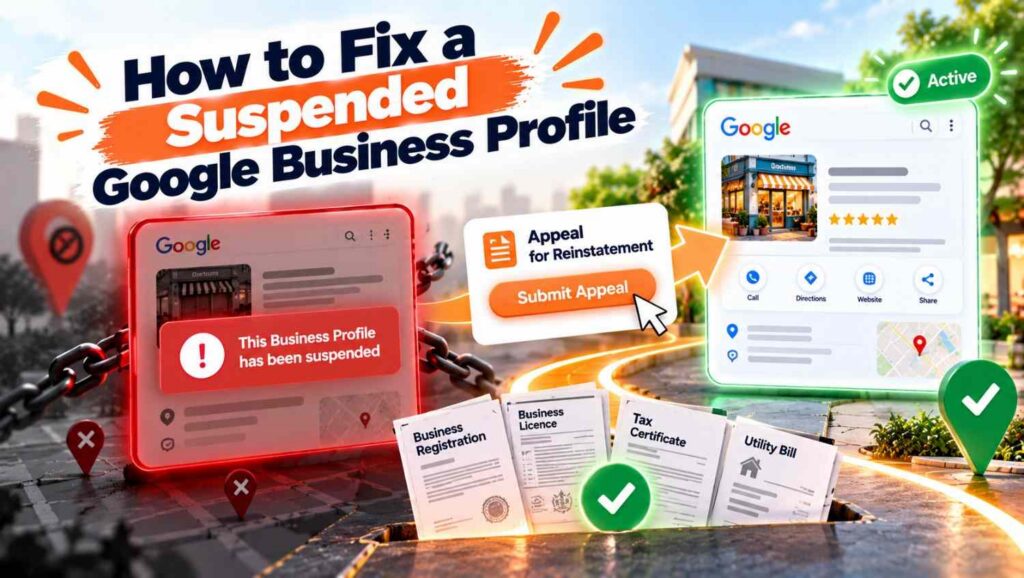
Direct answer: A Google Business Profile suspended for breaking guidelines can usually be fixed by finding the violation, correcting it first, then submitting one appeal with matching evidence such as a business registration, licence or utility bill. Never create a new profile for the same business. Google says appeals can be submitted only once, so prepare carefully.


  • A Google Business Profile suspended notice means Google believes the profile broke its guidelines
  • Fix the underlying problem before you appeal, not after
  • Google says appeals can be submitted only once, so do not rush the first attempt
  • Evidence such as a business registration, licence, tax certificate or utility bill should match your profile exactly
  • Do not create a new profile for the same business, because Google says not to
  • Google gives no fixed review time, so track your Google Business Profile suspended appeal in the appeals tool

Why a Google Business Profile suspended notice appears

Our article on why a business may not show on Google Maps lists suspension as one common cause, and this guide goes deeper. Google says it may suspend or disable Business Profiles that do not follow its guidelines. Its help page on suspended profiles does not list every violation, but the appeals tool shows the reason for each decision and links to the policy involved.

According to Search Engine Journal’s recovery guide, common triggers include stuffing keywords into the business name, using a PO box or virtual office as the address, showing a home address for a service area business, listing 24 hour opening times, duplicate listings and mismatched details across the web. The article also notes suspensions can happen for random reasons, including a glitch at Google’s end.

Suspended, disabled or soft suspended: what you are dealing with

Google describes two situations. In an account restriction, the profiles you manage are suspended and you cannot create or claim others until you lift the restriction. In a profile removal, the public cannot see the profile, and owners and managers cannot act on it.

Search Engine Journal adds a practical distinction. A hard suspension means the listing does not appear in search or Maps, while a soft suspension means it still shows but looks unverified and cannot be managed. The first step is simply knowing which one you have.

How to fix a Google Business Profile suspended: 7 steps

Our guide to Google local pack ranking factors explains what a healthy profile looks like, and the steps below take you back to that point.

1. Read the reason

Check the email from Google and open the appeals tool, which shows the reason for the decision. Do not guess. The reason tells you what to fix and what evidence to gather.

2. Check your profile against the guidelines

Google’s guidelines for representing your business say your name should reflect your real world name, your address should be precise and accurate, and you should use as few categories as possible. Compare your profile line by line.

3. Fix the problem first

Remove keywords from the name, correct the address or hide it if you are a service area business, set realistic opening hours and clear up duplicates. With a Google Business Profile suspended, fix first and appeal second, and Google tells you to confirm your profile follows all guidelines before you appeal. Search Engine Journal warns against appealing before the cause is fixed.

4. Gather your evidence

Google suggests official business registration, a business licence, tax certificates and utility bills such as electricity, phone, water or internet. The business name and address on each document should match the profile. Gather as many relevant documents as you honestly can.

5. Submit one careful appeal

Sign in to the appeals tool with the related Google Account, select the profile and the decision, add your evidence and an explanation, then confirm and submit. Google says appeals can be submitted only once, so treat the appeal for a Google Business Profile suspended case as your best shot.

Search Engine Journal’s 2024 guide describes a limited window to upload evidence after submitting and a 1,000 character limit for your explanation. Interfaces change, so follow the on screen instructions and keep your explanation short, factual and specific about what you changed.

6. Track the status

Tracking a Google Business Profile suspended appeal takes patience. The appeals tool shows whether your appeal is Submitted, Approved, Not Approved, Eligible for appeal or Can’t be appealed. Google gives no review timeframe and says it will email you the decision. Search Engine Journal says reviews take several days, but treat that as an estimate.

7. If you are refused, request another review

Google says you can ask for another review only if your reinstatement request is denied, and you should provide new evidence. Still do not create a new profile for the same business.

Mistakes that make a Google Business Profile suspended problem worse

Our guide to local SEO in Kent shows how a clean profile supports your wider strategy, and these errors do the opposite.

The most damaging are appealing before fixing the cause, creating a new listing, uploading documents whose name or address does not match, and making many edits in one session. Search Engine Journal also recommends not relying on a single channel for marketing, since a suspension can remove your Maps visibility.

How to avoid a Google Business Profile suspended notice in future

Our local SEO services include profile audits for exactly this reason. In practice, use your real business name, keep your address and hours accurate, hide your address if customers do not visit you, and avoid dramatic edits in a single sitting. Keep your details consistent across your website and directories too.

Examples

These are illustrative scenarios rather than client case studies, but they show how suspensions tend to be resolved.

A plumber found the profile suspended after adding service keywords to the business name. He restored the real name from his van signage, gathered his registration and a utility bill, and submitted a single appeal explaining the change.

A home baker listed her house address publicly while serving customers by delivery only. After hiding the address and setting a service area, she appealed with matching business documents.

A shop owner created a second profile after the first was suspended. The duplicate caused further problems, and he had to go back to the original appeal process instead.

Ready to get your profile back on track

A Google Business Profile suspended notice is stressful, but a careful, honest appeal gives you the best chance of recovery. At Atomic Artisans we help businesses audit and protect their listings through our local SEO services. Take a look at our pricing, book a call with our team, or get in touch through our contact page to get started.

Atomic Artisans Team

October 13, 2026

aeo seo

Agencia SEO Panamá

Agencia UGC Panamá

Agency vs In-House Marketing

AI content creation

AI content tools

AI content vs human content

AI Optimization

AI Overviews

AI Search

Direct answer: A Google Business Profile suspended for breaking guidelines can usually be fixed by finding the violation, correcting it first, then submitting one appeal with matching evidence such as a business registration, licence or utility bill. Never create a new profile for the same business. Google says appeals can be submitted only once, so prepare carefully.


  • A Google Business Profile suspended notice means Google believes the profile broke its guidelines
  • Fix the underlying problem before you appeal, not after
  • Google says appeals can be submitted only once, so do not rush the first attempt
  • Evidence such as a business registration, licence, tax certificate or utility bill should match your profile exactly
  • Do not create a new profile for the same business, because Google says not to
  • Google gives no fixed review time, so track your Google Business Profile suspended appeal in the appeals tool

Why a Google Business Profile suspended notice appears

Our article on why a business may not show on Google Maps lists suspension as one common cause, and this guide goes deeper. Google says it may suspend or disable Business Profiles that do not follow its guidelines. Its help page on suspended profiles does not list every violation, but the appeals tool shows the reason for each decision and links to the policy involved.

According to Search Engine Journal’s recovery guide, common triggers include stuffing keywords into the business name, using a PO box or virtual office as the address, showing a home address for a service area business, listing 24 hour opening times, duplicate listings and mismatched details across the web. The article also notes suspensions can happen for random reasons, including a glitch at Google’s end.

Suspended, disabled or soft suspended: what you are dealing with

Google describes two situations. In an account restriction, the profiles you manage are suspended and you cannot create or claim others until you lift the restriction. In a profile removal, the public cannot see the profile, and owners and managers cannot act on it.

Search Engine Journal adds a practical distinction. A hard suspension means the listing does not appear in search or Maps, while a soft suspension means it still shows but looks unverified and cannot be managed. The first step is simply knowing which one you have.

How to fix a Google Business Profile suspended: 7 steps

Our guide to Google local pack ranking factors explains what a healthy profile looks like, and the steps below take you back to that point.

1. Read the reason

Check the email from Google and open the appeals tool, which shows the reason for the decision. Do not guess. The reason tells you what to fix and what evidence to gather.

2. Check your profile against the guidelines

Google’s guidelines for representing your business say your name should reflect your real world name, your address should be precise and accurate, and you should use as few categories as possible. Compare your profile line by line.

3. Fix the problem first

Remove keywords from the name, correct the address or hide it if you are a service area business, set realistic opening hours and clear up duplicates. With a Google Business Profile suspended, fix first and appeal second, and Google tells you to confirm your profile follows all guidelines before you appeal. Search Engine Journal warns against appealing before the cause is fixed.

4. Gather your evidence

Google suggests official business registration, a business licence, tax certificates and utility bills such as electricity, phone, water or internet. The business name and address on each document should match the profile. Gather as many relevant documents as you honestly can.

5. Submit one careful appeal

Sign in to the appeals tool with the related Google Account, select the profile and the decision, add your evidence and an explanation, then confirm and submit. Google says appeals can be submitted only once, so treat the appeal for a Google Business Profile suspended case as your best shot.

Search Engine Journal’s 2024 guide describes a limited window to upload evidence after submitting and a 1,000 character limit for your explanation. Interfaces change, so follow the on screen instructions and keep your explanation short, factual and specific about what you changed.

6. Track the status

Tracking a Google Business Profile suspended appeal takes patience. The appeals tool shows whether your appeal is Submitted, Approved, Not Approved, Eligible for appeal or Can’t be appealed. Google gives no review timeframe and says it will email you the decision. Search Engine Journal says reviews take several days, but treat that as an estimate.

7. If you are refused, request another review

Google says you can ask for another review only if your reinstatement request is denied, and you should provide new evidence. Still do not create a new profile for the same business.

Mistakes that make a Google Business Profile suspended problem worse

Our guide to local SEO in Kent shows how a clean profile supports your wider strategy, and these errors do the opposite.

The most damaging are appealing before fixing the cause, creating a new listing, uploading documents whose name or address does not match, and making many edits in one session. Search Engine Journal also recommends not relying on a single channel for marketing, since a suspension can remove your Maps visibility.

How to avoid a Google Business Profile suspended notice in future

Our local SEO services include profile audits for exactly this reason. In practice, use your real business name, keep your address and hours accurate, hide your address if customers do not visit you, and avoid dramatic edits in a single sitting. Keep your details consistent across your website and directories too.

Examples

These are illustrative scenarios rather than client case studies, but they show how suspensions tend to be resolved.

A plumber found the profile suspended after adding service keywords to the business name. He restored the real name from his van signage, gathered his registration and a utility bill, and submitted a single appeal explaining the change.

A home baker listed her house address publicly while serving customers by delivery only. After hiding the address and setting a service area, she appealed with matching business documents.

A shop owner created a second profile after the first was suspended. The duplicate caused further problems, and he had to go back to the original appeal process instead.

Ready to get your profile back on track

A Google Business Profile suspended notice is stressful, but a careful, honest appeal gives you the best chance of recovery. At Atomic Artisans we help businesses audit and protect their listings through our local SEO services. Take a look at our pricing, book a call with our team, or get in touch through our contact page to get started.

Share this

whatsapp

Find out our more services

Is Your Business Invisible on AI Search?

Get a free audit of your website’s AI visibility, SEO health, and Google Business Profile — no strings attached.

Learn more

View Our Plans from $99/mo

Quick Fact Check

AI is expected to handle  25% of all global search queries by 2026
Businesses that optimise for AI now will have a 6–12 month head start over competitors.

Source: TheeDigital, Squarespace SEOSpace 2025

FAQ’s

Frequently Asked Questions 

atomic artisans logo
Privacy Overview

This website uses cookies so that we can provide you with the best user experience possible. Cookie information is stored in your browser and performs functions such as recognising you when you return to our website and helping our team to understand which sections of the website you find most interesting and useful.